
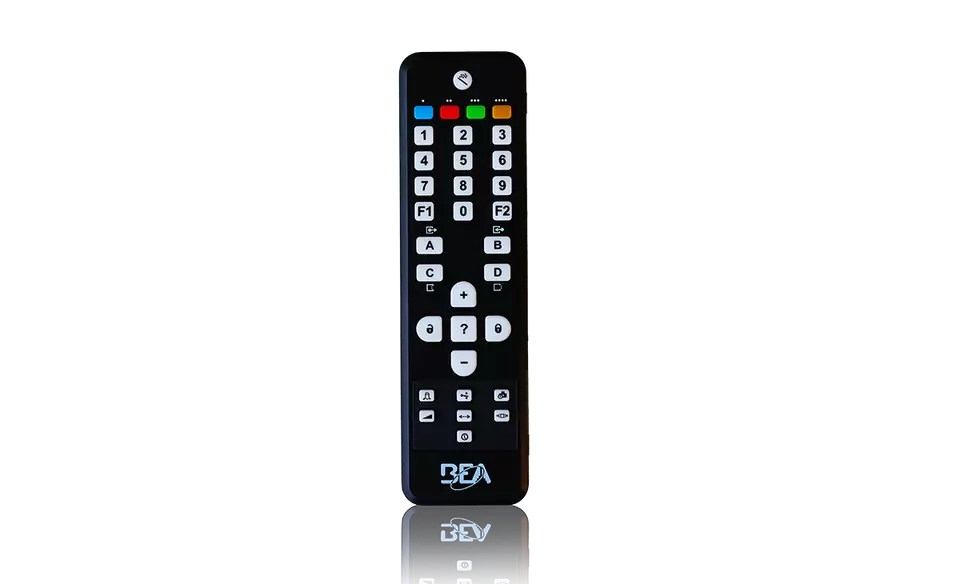
Description
The BEA Programming Remote is a universal handheld programming tool designed for the setup, adjustment and commissioning of compatible BEA sensors.
Rather than making adjustments directly at the sensor, installers can use the remote to access programming functions, perform teach-in procedures, check existing values and modify operating parameters from a convenient position.
The remote is compatible with a wide range of BEA automatic door, industrial door, gate, barrier and laser scanning sensors, including the LZR-I100 and LZR-I110 laser scanners.
For installers regularly working with BEA detection equipment, the Programming Remote provides a convenient reusable tool that can be used across multiple compatible sensor models.
🎛️ Universal BEA Programming Tool
The BEA Programming Remote has been designed as a universal adjustment tool for compatible BEA sensors.
One remote can be used across numerous compatible products rather than requiring a separate programming device for every sensor.
This makes it particularly useful for:
- Automatic door installers
- Gate automation technicians
- Industrial door technicians
- Service technicians
- Access control installers
- Maintenance personnel
The available programming functions depend on the BEA sensor being adjusted.
🔴 Compatible with LZR-I100 / I110
The BEA Programming Remote is an official programming accessory for the BEA LZR-I100 and LZR-I110 laser scanners.
It can be used during installation and commissioning to access the sensor’s programmable parameters and configure the detection system according to the application.
This makes it particularly useful when commissioning the LZR-I110 5m × 5m laser scanner.
🔓 Unlock Sensor Programming
Compatible BEA sensors can be unlocked for programming using the dedicated unlock button on the remote.
Once the sensor has been unlocked, the installer can access the available programming functions.
This helps prevent accidental parameter changes during normal operation.
🔒 Lock Programming
After programming has been completed, the dedicated lock function can be used to exit the programming session and protect the sensor against unwanted changes.
On compatible products, additional access protection may also be available according to the sensor’s programming system.
❓ Check Existing Values
The remote incorporates a dedicated value-check function.
This allows the installer to check the currently programmed value of a compatible sensor parameter before making an adjustment.
This is particularly useful during:
- Commissioning
- Troubleshooting
- Routine servicing
- Existing installation inspections
- Parameter verification
Rather than changing a setting simply to determine its value, the existing configuration can be checked first.
➕ Incremental Adjustment
Dedicated increase and decrease controls allow compatible parameter values to be adjusted incrementally.
This provides convenient fine adjustment where a parameter supports incremental programming.
The exact adjustment range depends on the connected BEA sensor and selected function.
🔢 Numeric Programming Keys
The BEA Programming Remote incorporates a full numeric keypad.
Numeric keys from 0 to 9 are used to select settings and enter parameter values according to the programming structure of the compatible sensor.
The numeric keypad provides a straightforward method of entering specific programming values without requiring complicated sensor-mounted button sequences.
🪄 Setup & Teach-In Functions
The remote provides access to setup and teach-in functions on compatible BEA sensors.
Teach-in is particularly important for laser scanning sensors such as the LZR range.
During a teach-in procedure, the sensor can learn its surrounding environment and establish the required detection area according to the installation.
Depending on the sensor, the setup controls can also provide access to:
- Teach-in procedures
- Factory values
- Presettings
- Detection field setup
- Sensor commissioning
🎯 Detection Field Programming
When used with compatible LZR laser scanners, the remote can be used to configure parameters associated with the sensor’s detection fields.
Depending on the particular LZR model, programmable functions can include:
- Detection field width
- Detection field depth
- Detection field height
- Active laser curtains
- Output functions
- Detection behaviour
- Immunity settings
- Output configuration
- Detection delays
Available functions vary between LZR models.
🟢 Active Detection Curtain Selection
Compatible LZR scanners use multiple laser curtains to create their detection fields.
The BEA Programming Remote can be used with supported sensors to activate or deactivate individual detection curtains according to the requirements of the installation.
This allows the installer to customise the detection area rather than relying solely on the factory configuration.
📐 Detection Field Adjustment
The remote provides access to detection field dimensions on compatible BEA laser scanners.
Depending on the sensor, the installer can adjust parameters such as:
- Field width
- Field depth
- Field height
- Optional detection zones
- Safety detection zones
This allows the scanner’s detection pattern to be adapted to the physical layout of the automatic door, gate or barrier.
🛡️ Safety Field Configuration
On compatible safety sensors, the remote can be used to configure the parameters associated with the safety detection field.
This allows the detection area to be tailored according to the installation and applicable sensor requirements.
Any safety-related adjustment must be followed by complete testing of the sensor and automated system.
⚙️ Output Configuration
Compatible BEA sensors provide programmable output functions that can be accessed using the remote.
Depending on the sensor, output configuration can determine:
- Which detection field operates an output
- Output logic
- Normally Open or Normally Closed behaviour
- Safety output operation
- Activation output operation
- Presence output operation
The available settings depend entirely on the connected sensor.
⏱️ Detection Delay Adjustment
Selected BEA sensors provide adjustable output activation or detection delays.
These parameters can be accessed using the Programming Remote where supported.
Detection delays can help optimise sensor performance for the specific installation environment.
Safety-related delay settings should only be adjusted according to the manufacturer’s requirements.
🌧️ Immunity Adjustment
Compatible BEA sensors may provide adjustable immunity filters.
These settings can help optimise sensor performance for different environmental conditions.
Depending on the sensor, immunity settings may provide options for environments such as:
- Indoor installations
- Outdoor installations
- Low environmental interference
- Medium environmental interference
- High environmental interference
The available settings depend on the sensor model.
📏 Minimum Object Size
Selected BEA laser scanners allow the minimum detected object size to be configured.
Where supported, the Programming Remote provides access to this parameter.
This can help configure the scanner according to the requirements of the application while reducing unwanted detections.
Safety-related object detection settings must always comply with the requirements of the installation.
🔄 Factory Value Functions
The remote provides access to factory value functions on compatible BEA sensors.
This can be useful during:
- Initial commissioning
- Reconfiguration
- Troubleshooting
- Sensor replacement
- Returning an installation to a known configuration
Resetting a sensor to factory settings will remove previously configured parameters, so the sensor must be correctly recommissioned afterwards.
🧰 Service & Troubleshooting Tool
The BEA Programming Remote is not limited to initial installation.
It is also a useful servicing and troubleshooting tool.
A technician can use the remote to:
- Check existing parameter values
- Confirm sensor configuration
- Adjust detection fields
- Change immunity settings
- Modify outputs
- Perform teach-in procedures
- Restore factory settings
- Recommission compatible sensors
This makes it particularly useful for technicians maintaining multiple BEA installations.
🚪 Automatic Door Applications
The Programming Remote is compatible with numerous BEA sensors used on automatic pedestrian doors.
Depending on the sensor, it can be used to configure:
- Opening detection
- Presence detection
- Safety detection
- Detection field dimensions
- Sensor outputs
- Operating modes
This makes the remote a useful universal tool for automatic door technicians.
🏭 Industrial Door Applications
The remote is also compatible with multiple BEA sensors designed for industrial doors.
Applications include sensors used for:
- Industrial sectional doors
- Warehouse doors
- High-speed doors
- Loading areas
- Commercial vehicle entrances
- Industrial access points
Compatible sensors include several products within the BEA LZR and industrial sensor ranges.
🚧 Gate & Barrier Applications
The BEA Programming Remote is compatible with selected sensors used for automatic gates and barriers.
This includes compatible LZR laser scanners designed for gate and rising barrier applications.
The remote allows installers to configure the sensor according to the required vehicle detection and safety zones.
🔦 LZR Laser Scanner Programming
The Programming Remote is particularly useful with the BEA LZR laser scanner family.
Depending on the LZR model, the remote can provide access to parameters including:
- Detection field dimensions
- Active detection curtains
- Detection outputs
- Immunity filters
- Minimum object sizes
- Detection delays
- Teach-in procedures
- Output configuration
- Sensor alignment functions
This makes the remote an important commissioning accessory when installing compatible LZR sensors.
🚦 LZR-H100 Programming
For the BEA LZR-H100 gate and barrier laser scanner, the Universal Remote Control is required for installation and setup.
The remote provides access to functions including:
- Sensor teach-in
- Output functions
- Active detection curtains
- Motion field adjustment
- Presence field adjustment
- Immunity settings
- Output configuration
- Detection delays
- Sensor programming lock
This demonstrates the importance of the remote when servicing BEA’s more advanced laser scanning systems.
🏗️ LZR-I100 / I110 Programming
The BEA Programming Remote is also an official compatible accessory for the LZR-I100 and LZR-I110 industrial door laser scanners.
It provides a convenient method of configuring the sensor after physical installation and alignment.
This makes it an ideal companion product for installations using the:
- LZR-I100
- LZR-I110 5m × 5m
🔄 One Remote for Multiple Sensors
A major advantage of the BEA Programming Remote is that it does not need to remain permanently at one installation.
The same remote can be used to commission and service multiple compatible BEA sensors.
This makes it particularly useful for professional installers who regularly work with BEA products.
One programming remote can remain in the technician’s service kit and be used whenever a compatible sensor needs to be installed or adjusted.
⭐ Key Features
- Genuine BEA programming accessory
- Universal remote control for compatible BEA sensors
- Designed for sensor adjustment and commissioning
- Compatible with LZR-I100
- Compatible with LZR-I110
- Compatible with LZR-H100
- Compatible with LZR-WIDESCAN
- Compatible with numerous additional BEA sensors
- Dedicated unlock function
- Dedicated lock function
- Check existing parameter values
- Incremental increase function
- Incremental decrease function
- Numeric keypad
- Setup functions
- Teach-in functions
- Factory value functions
- Presetting functions
- Detection field programming
- Active detection curtain programming on compatible sensors
- Output configuration
- Immunity adjustment on compatible sensors
- Detection delay adjustment on compatible sensors
- Suitable for automatic doors
- Suitable for industrial doors
- Suitable for gate and barrier sensors
- Reusable across multiple compatible installations
- Ideal for installers and service technicians
🔧 Specifications
- Manufacturer: BEA
- Product: Universal Programming Remote Control
- Product Type: Sensor Programming Remote
- BEA US Reference: 10REMOTE
- Programming Method: Wireless Remote Control
- Numeric Keypad: Yes
- Unlock Function: Yes
- Lock Function: Yes
- Check Value Function: Yes
- Incremental Increase / Decrease: Yes
- Setup / Teach-In Functions: Yes
- Factory Value Functions: Yes
- Presetting Functions: Yes
- Detection Field Adjustment: Sensor Dependent
- Output Configuration: Sensor Dependent
- Detection Delay Adjustment: Sensor Dependent
- Immunity Adjustment: Sensor Dependent
- Suitable for LZR Sensors: Yes
- Suitable for Multiple Compatible Sensors: Yes
🔗 Compatibility
The BEA Programming Remote is compatible with a broad range of BEA sensors.
Compatible products include selected:
- LZR-I100
- LZR-I110
- LZR-H100
- LZR-S600
- LZR-WIDESCAN
- LZR-FLATSCAN models
- IXIO sensors
- EAGLE sensors
- CONDOR sensors
- FALCON sensors
- Automatic door sensors
- Industrial door sensors
- Gate and barrier sensors
Programming functions vary significantly between products.
Always refer to the programming instructions for the specific BEA sensor being commissioned.
⚠️ Please Note
The BEA Programming Remote is a programming and adjustment accessory only. A sensor is not included.
Available buttons and programming functions depend on the specific BEA sensor being adjusted.
Not every function shown on the remote is applicable to every compatible sensor.
For LZR installations, always follow the programming sequence specified for the exact LZR model.
Changes to safety-related detection fields, output configuration, immunity, minimum object size or detection delays can affect the safety performance of the automated system.
After any safety-related programming change, the complete detection area and operation of the automatic door, gate or barrier must be tested.
Some compatible BEA sensors automatically lock remote-control access after a period of inactivity and may require the manufacturer’s specified procedure to regain programming access.
Installation, programming and safety testing should be completed in accordance with the instructions for the connected BEA sensor.